Leveraging an AI-forward development process, I led the evolution of Acuity Scheduling beyond 1:1 appointments, bringing in a new era of class scheduling and tapping into an underserved market.
Interim PM
20x more classes created since going live
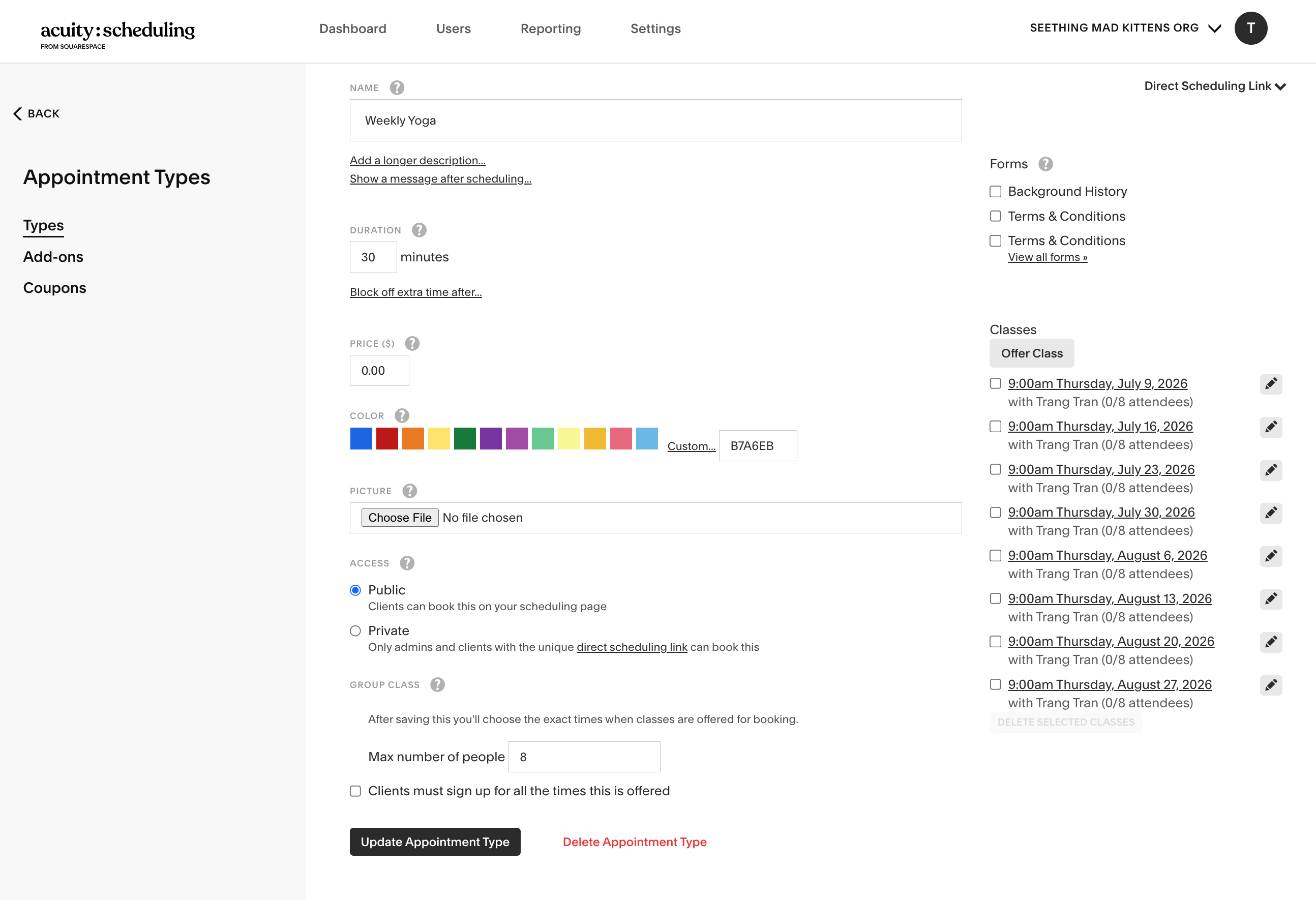
Acuity, Squarespace's scheduling platform, was originally built for 1:1 appointments. Class support was added later and haphazardly, forcing admins to create classes the same way they'd do appointments—without the ability to scale and knowing what their calendar looks like.
Admins don't get to see their schedule at the time of creating their classes
This was a pattern copied directly from appointment creation, where appointments are determined by availability which is set up elsewhere. Meanwhile, class times are determined by an admin, but they sometimes need more calendar context for those decisions.
It's not clear to an admin when to set up a class vs. an appointment
There isn't enough context that clearly spells out the differences. Admins take a gamble at creating the right type for their business.
Lack of class customization and functionality to support scaling
Admins aren't able to bulk edit recurring sessions in a class. Instead, they'd have to go into each individual instance to make updates.
Even though Acuity is mainly appointments-based, there was a huge market for classes. We had a small amount of class businesses on the platform, but some were churning due to poor class support.
Fitness studios, yoga instructors, and educators were left with an experience that was cobbled together and not designed around their class-based workflows. These people were leaving in droves, but not without leaving customer support tickets pinpointing the pains of running their classes on our platform.
I met with current class-based users to learn how they run their business on Acuity, what types of classes they offer, and what was hard to do in the product.
There were a few patterns that validated or challenged our assumptions:
Classes are offered as one of two types: a one-off session or part of a "bootcamp"
Bootcamps are popular for education-based businesses, where clients are enrolled in a set of sessions and pay all at once for at booking. One-offs were also popular for studios, where clients can join single sessions.
Admins naturally thought of their calendar when they wanted to create classes
This pathway felt more organic because they'd be working off of a calendar and specific time blocks, but that's not something they can do today in the product. Classes can only be created from a form on the appointment types landing page.
Scaling beyond one session was tedious and sometimes impossible
Admins had to update each class session individually, making bulk changes tedious. Recurring sessions were even more rigid—individual instances couldn't have different times or durations.
Squarespace had just begun rolling out AI tools internally. With traditional processes being challenged by AI, I experimented and built an elaborate prototype with Claude Code. This vision excited Leadership, and became our focus for the year.
Built in just days, the vision prototype was grounded in months of research and customer insights. AI accelerated discovery, helping us test with users early, uncover edge cases, and quickly iterate. I even built bespoke tools, like in-prototype commenting, to bridge documentation and collaboration gaps and keep teams aligned from vision to execution.
However, engineers struggled to use the prototype as the source of truth because it wasn't connected to our design system MCP, which was still in development. This led to style discrepancies between design and build. The decision: move everything to Figma.
While it wasn't the most efficient approach, it was the one that unblocked development. I ended up creating Figma screens of the Claude prototype to help engineers feel more comfortable. Despite the setback, nothing in the designs changed.
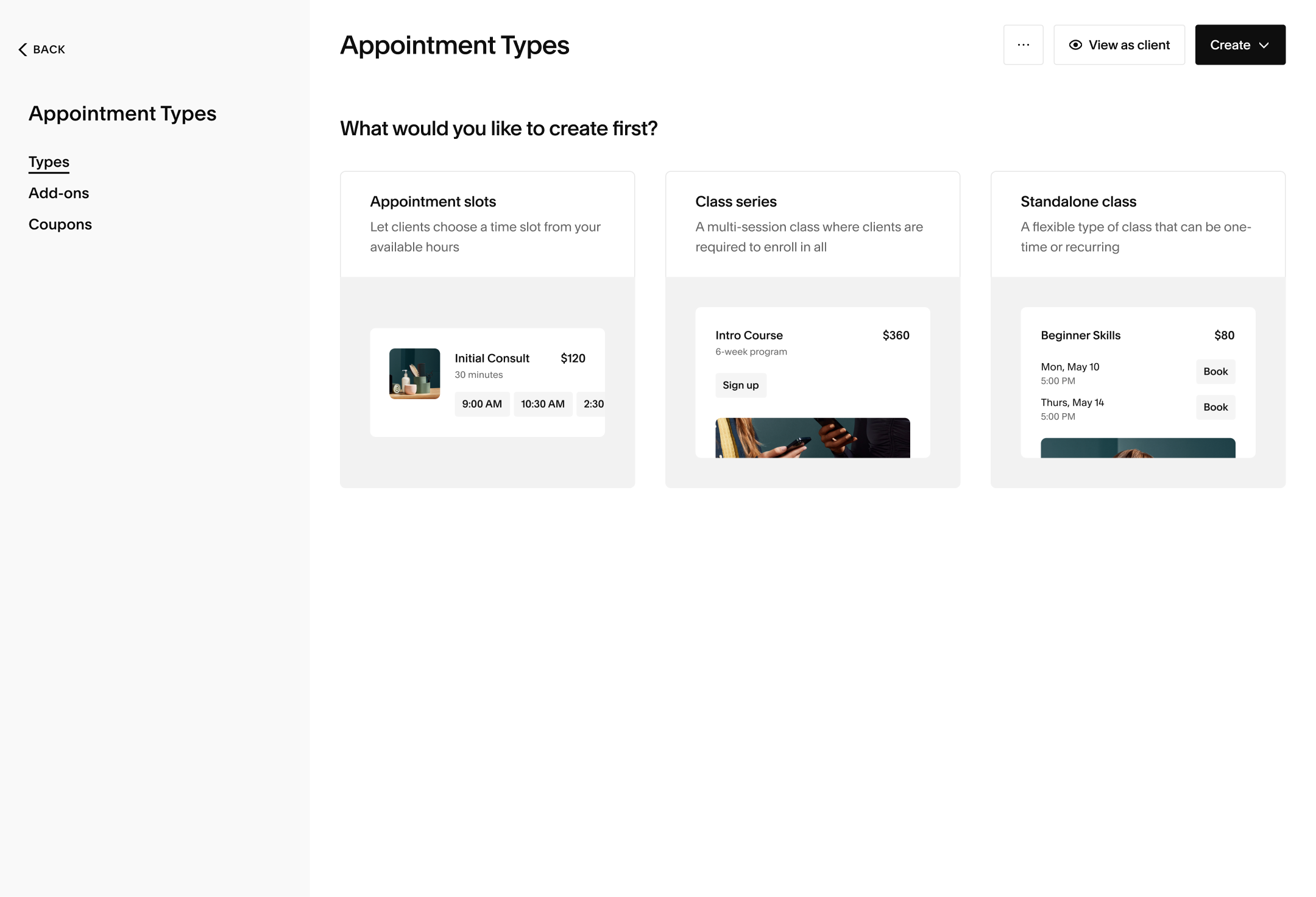
Surfacing Series vs. Standalone Classes upfront
In the old flow, the distinction wasn't clear and it was possible to flip flop between the two after having created a class. This opened up payment issues downstream. In my proposal, we held strong convictions that these two class offerings are entirely different from one another and should not be interchangeable.
Class creation with the user's mental model in mind
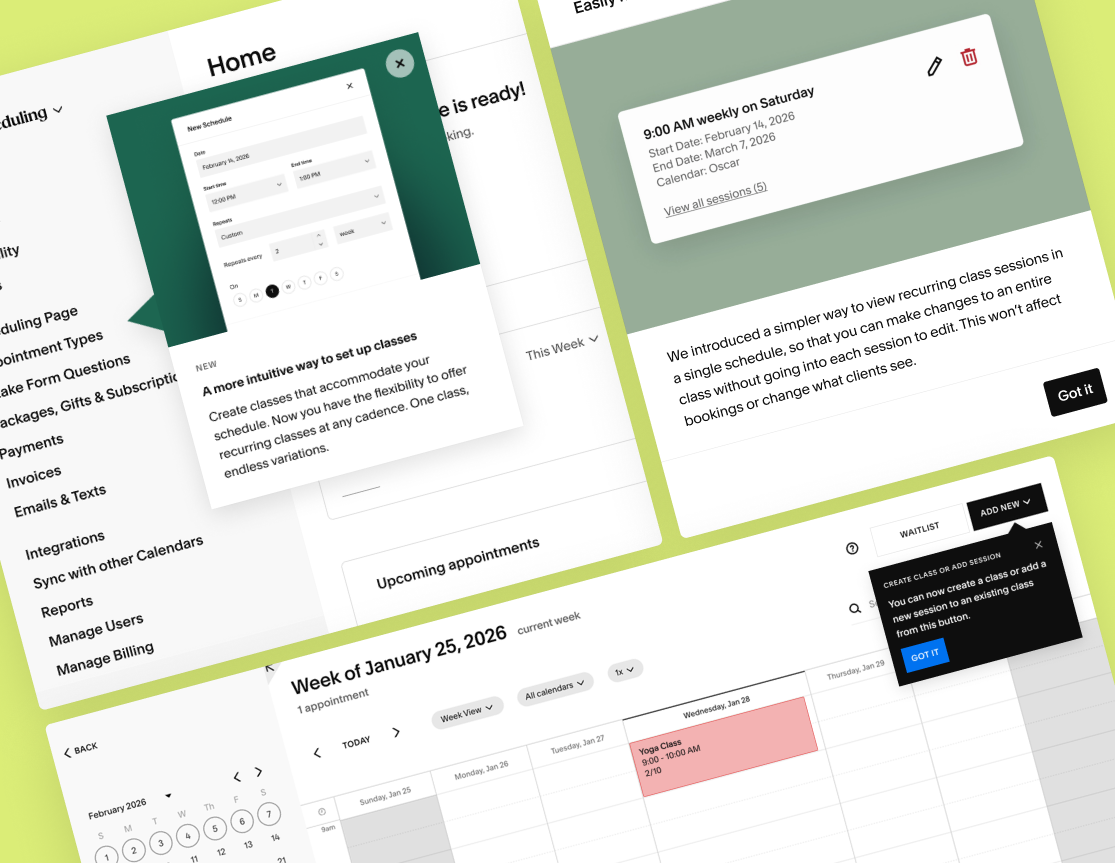
Admins can now create classes and/or add sessions to existing classes from their calendar in addition to the appointment types page, so they can see what other commitments they have.
Introducing Schedules for flexible customization of classes and their sessions
All sessions are now associated with a schedule, which defines when and how a session should appear. Changes made at this level propagate into sessions, with individual session overrides. This unlocks deeper customization for recurring classes.
Complex scheduling scenarios that made our heads spin
With most of the details and polish already done during concepting, it was time to tackle the hard stuff: bug bash feedback and complex edge cases. It wasn't until we got everyone's undivided attention and extreme focus in testing, that we started realizing the tricky scenarios that come with recurring schedules. We came up with the following recommendations for mindbending problems:
What happens if an admin edits an existing schedule for a series, resulting in a new amount of occurrences?
Past occurrences cannot be changed, future occurrences with enrollments should be protected, and empty future occurrences should be dropped.
Can an admin add a new session to a series that already has attendees?
We block any type of schedule change that results in a new session being added, if there are already attendees.
We underestimated the complexity of migrating existing class users with many sessions. How confidently can we neatly group their existing sessions into schedules?
Automatically group like-sessions into a schedule for "migrated" users
We made a bet and assumed that admins with recurring sessions tethered by a similar time and cadence will want to see these sessions grouped together. We would group those sessions into a schedule upon the existing user's first exposure to the new class experience.
Things we left off the table for now
There were a lot of niceties that were included in the original Claude prototype that we descoped in favor of a faster delivery. We grounded ourselves in working to deliver value quickly, and iteratively.
Delightful calendar interactions
For the calendar page, we decided to forego direct calendar block manipulation and just have classes be created from the Create button. This is a surface jointly owned by the Appointments Team, so we felt that untangling this with another team wasn't worth a later launch.
Dedicated class management UX
The original designs had additional workflows where admins can dive into a session of a class and see attendees in a separate screen. The amount of effort to make this happen would have set us back even more. Plus, we already have a workaround, albeit primitive, using the current UI for this.
We launched to 100% of new users first. The next week, we rolled it out to 10% of existing users, and then ramped up to 100% of existing users the following week. Since the launch, there has been a 20x increase in new classes created.
Class creation became simpler, faster, and built to scale. Customers responded enthusiastically, with some reaching out to celebrate long-requested features. We anticipated feedback around past sessions and schedules, quickly shipping follow-ups that steadily brought the experience closer to our vision, all while generating marketing buzz along the way.
Lastly, AI is not the silver bullet that everyone's making it out to be.
The project started strong: a feature-rich prototype helped secure buy-in, communicate the vision, and capture each iteration as the product evolved. I was also one of the first to adopt AI this deeply in our product development process. But being an early adopter came with growing pains. We had no clear guidelines for how AI prototypes should fit into the workflow, what they could replace, or how to preserve documentation and institutional knowledge when so much of the work lived in markdown files. Much of what I built in Claude predated the scaffolding that Squarespace eventually set up for teams building with AI.
Ultimately, I came back to what I instinctively design for: people. When the Claude prototype started creating friction for engineers and made collaboration harder than Figma, the right move was clear—I pivoted. Not away from AI, but toward a workflow that my team was more comfortable with.